.webp)
Google Business Profile Optimization: The Complete Guide for Business Owners to Maximize Local Visibility and Lead Generation
In an increasingly digital world, establishing a strong online presence is essential for businesses to attract local customers effectively. A Google Business Profile (GBP) serves as a vital tool, enhancing visibility on search engines and maps, thus allowing potential customers to find essential information quickly. This comprehensive guide outlines everything business owners need to know about setting up, optimizing, and managing their Google Business Profile to drive lead generation and local engagement. Many businesses often fail to take full advantage of their GBP, missing out on significant opportunities for attracting clients. By leveraging the insights in this article, you'll understand how to enhance your GBP effectively and create a robust online presence that converts inquiries into leads. We will dive into topics including the setup and verification process, optimization strategies, local SEO, and best practices for maintaining your profile.
What is Google Business Profile and Why Does It Matter for Business Owners?
Google Business Profile is a free tool offered by Google that allows businesses to manage their online presence across Google, including Search and Maps. Business owners can create a profile that displays essential information such as location, hours, and services. By utilizing GBP, businesses enhance their local visibility, making it easier for customers to discover them when searching for relevant services nearby. This increased visibility plays a crucial role in customer engagement, driving traffic to websites, and ultimately boosting lead generation through local outreach.
Managing a GBP provides business owners with an opportunity to connect directly with customers. It allows them to respond to reviews, post updates, and upload photos that showcase their offerings. A well-managed Google Business Profile not only builds consumer trust but also increases the likelihood that potential customers will choose your services over competitors.
The profound impact of Google Business Profile on local businesses cannot be overstated, as it directly influences how potential customers discover and engage with services in their vicinity.
.png)
How Does Google Business Profile Enhance Local Business Listings?
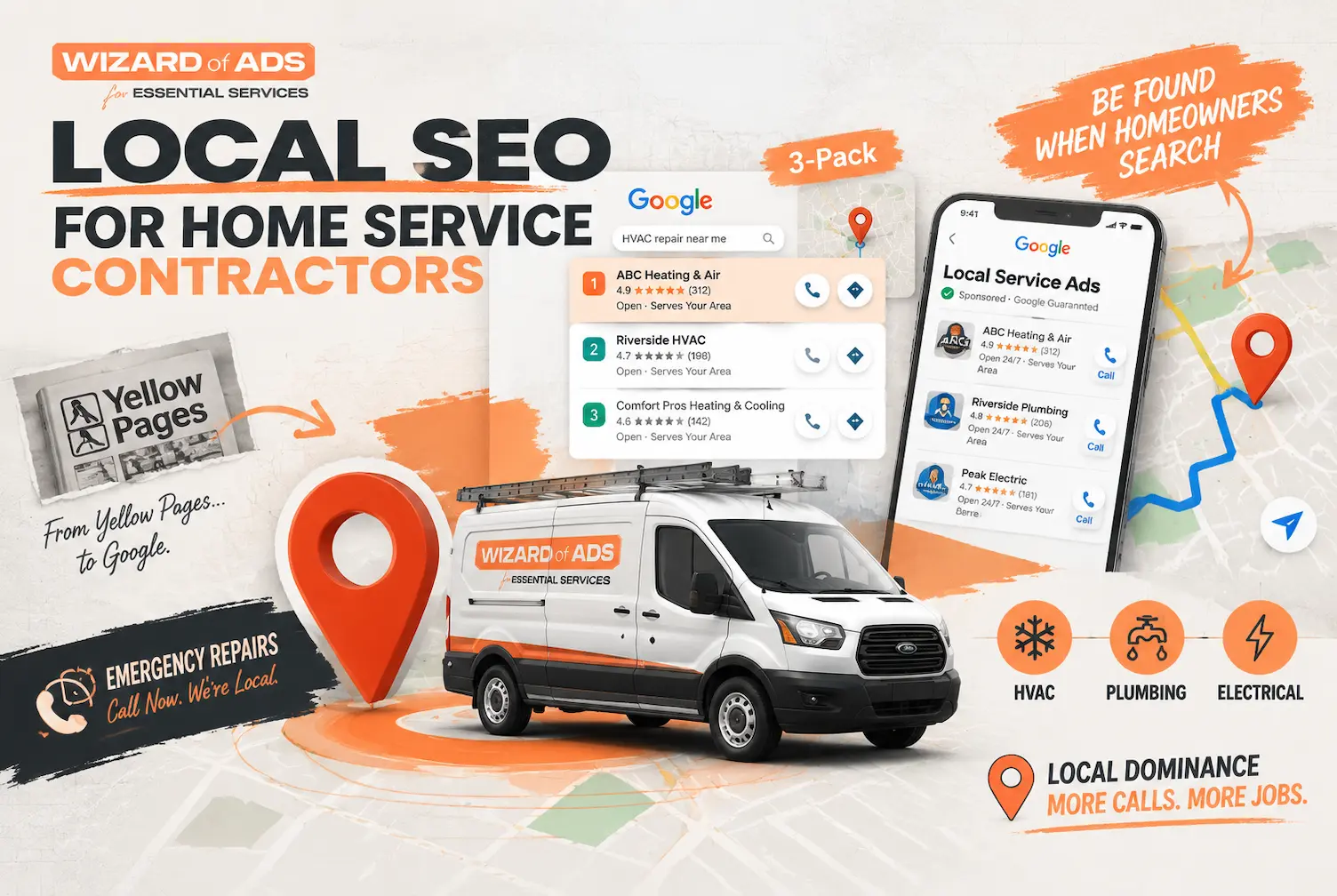
Google Business Profile enhances local business listings by ensuring that search results reflect accurate and updated information. With GBP, businesses can optimize their visibility in local searches through relevant categories and by providing comprehensive details about their services. Local SEO techniques integrated within GBP, such as utilizing keywords specific to services offered, directly contribute to higher rankings in search engine results.
Additionally, GBP enables businesses to manage their information actively, ensuring that potential customers have access to the latest updates regarding services, special offers, or changes in operations. The integration of customer reviews into search results further enhances a business's profile, impacting reputation and engagement. By responding to reviews promptly, businesses signal their commitment to customer service and satisfaction, creating a favorable impression on prospective clients.
The strategic implementation of Local SEO through Google Maps significantly boosts a business's digital presence and helps convert online visibility into actual customer visits.
Local SEO on Google Maps for Increased Business Visibility
In today’s digital era, consumer behavior in searching for building materials and home renovation services has shifted to digital platforms, especially Google Maps. Traditional building material businesses still lag behind in digital visibility and often lose competitiveness against modern building depots. This community service activity aims to help traditional MSMEs survive and grow through digitalization by increasing business visibility and customer footfall conversion. This study applied a local Search Engine Optimization (SEO) approach through a case study of a building material MSME. The research stages included initial observation of the business profile and customer visits, implementation of Local SEO optimization strategies, and final observation to evaluate the resulting changes. Optimization strategies included completing business information, applying local keywords, adding visual content, and actively managing customer reviews. The novelty of this researcImplementation of local seo on google maps for increasing footfall conversion in building store business, 2026
What Are the Key Benefits of Managing Your Google Business Profile?
Managing a Google Business Profile comes with several key benefits, including:
- Increased Visibility: Regularly updating your GBP ensures that your business appears in relevant local searches, making it easier for potential customers to find you.
- Enhanced Customer Trust: Engaging with customer reviews and posting updates demonstrates your commitment to being transparent and responsive, fostering trust.
- Improved Lead Generation: With an optimized GBP, the chances of attracting local leads significantly increase as potential customers find the information they need readily available.
The management of your Google Business Profile plays a crucial role in ensuring your business is represented accurately online. Moreover, it opens the door to analytics and insights that help you understand customer interactions and preferences, which can inform future business decisions.
How Do Business Owners Set Up and Verify Their Google Business Profile?
Setting up a Google Business Profile is straightforward and requires several key steps.
- Create a Google Account: If you do not already have a Google account, you need to create one.
- Set Up Your Business Information: Enter essential details such as your business name, address, phone number, and website URL.
- Verification: Google requires verification to ensure that business information is accurate. Verification can occur via postcards, phone, email, or instant verification for eligible businesses.
Step-by-Step Guide to Set Up Google Business Profile
To further clarify, here’s a detailed look at how to set up your GBP:
- Go to the Google Business Profile page and click on “Manage now.”
- Sign in with your Google account or create a new one if necessary.
- Enter your business information, including business name, address, and service area.
- Choose the correct categories that best represent your business for customers to find you more easily.
- Add contact details and a website link to improve connections with potential customers.
- Complete the profile with images and business hours, providing a comprehensive view of what you offer.
- Verify your listing using one of the methods mentioned above to activate your profile for public view.
Successful verification confirms that you are the owner of the listed business and allows management of your profile effectively.
Getting your business listed on Google Maps is a crucial, mostly free, and straightforward process that can determine whether potential customers find you in their immediate search.
Getting Your Business on Google Maps for Local Customers I pulled up my phone last week to find a coffee shop in an unfamiliar neighborhood. Within seconds, I had four options with ratings, photos, hours, and directions. The whole process took maybe 15 seconds.That’s the reality of how people find local businesses now. Nobody’s flipping through phone books or asking random strangers for directions. They search, they tap, they arrive. If you want to get your business on Google Maps and show up in that 15-second window, the work is mostly free, mostly one-time, and more straightforward than most owners assume. Skip it and you don’t exist to that potential customer.
How Can Business Owners Optimize Their Google Business Profile to Drive More Leads?
Optimizing your Google Business Profile involves several strategies to ensure that your listing stands out and effectively attracts local customers.
- Complete Your Profile: Ensure all fields are filled out, including business hours, contact information, and a description of services. The more complete your profile, the more trustworthy it appears.
- Utilize Local Keywords: Integrate relevant local SEO keywords into your business description and posts to improve search engine visibility and attract targeted traffic.
- Engage Customers with Updates: Regularly post updates about services, special promotions, and business announcements to maintain engagement with your audience.
These strategies can significantly enhance your GBP's performance, ultimately leading to increased inquiries and business growth.
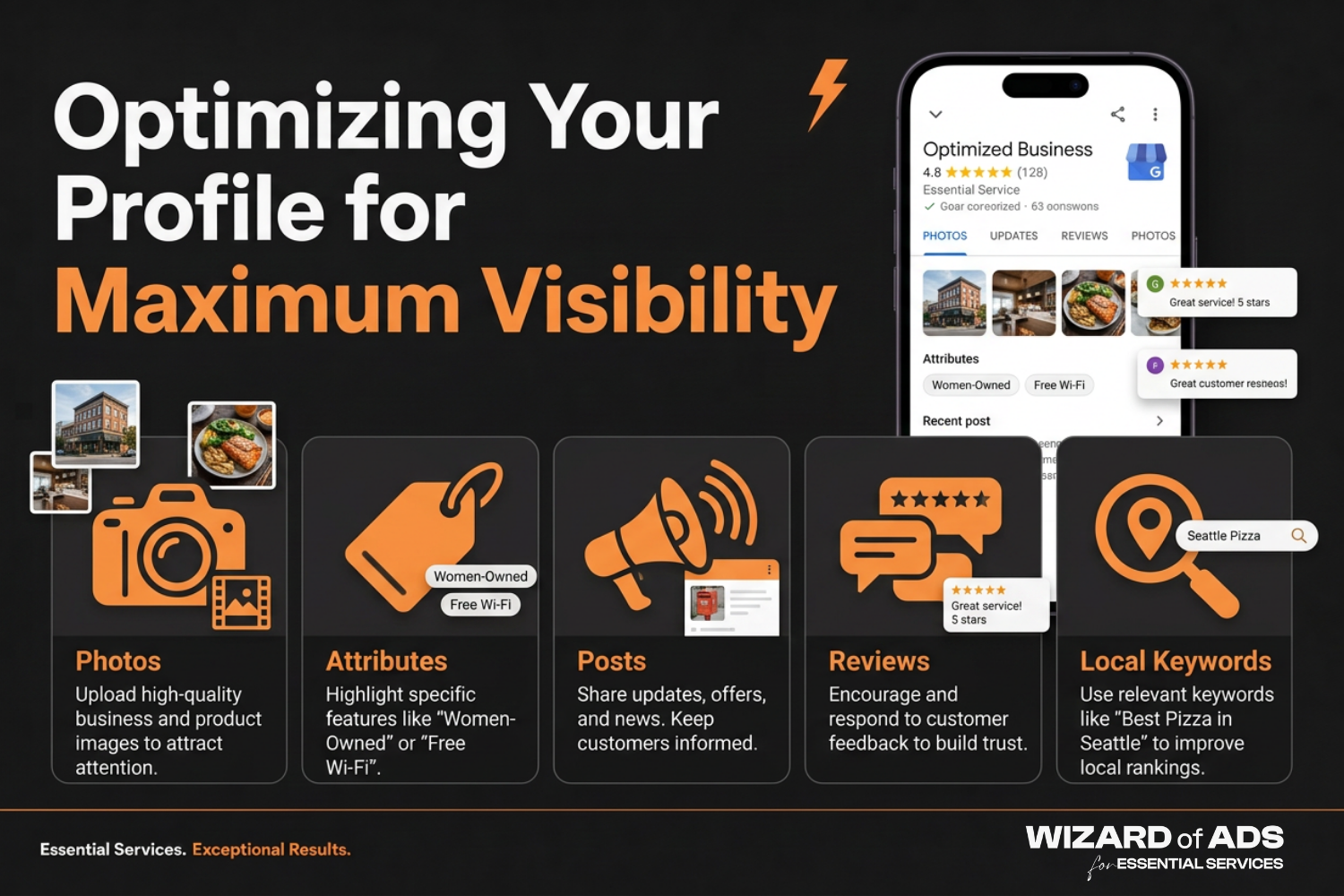
Which Profile Elements Should Be Enhanced: Photos, Attributes, and Posts?
Visual elements of your GBP play a vital role in attracting potential customers. High-quality photos of your business, products, or services enable visual storytelling that engages visitors. Additionally, it is essential to regularly update your profile with relevant posts about special offerings or events. Engaging visual content leads to improved customer interactions and can motivate users to visit your business.
- Photos: Upload diverse and high-quality images that represent your brand.
- Attributes: Specify attributes that describe your business, such as "women-owned" or "free Wi-Fi," enhancing appeal to specific customer segments.
- Posts: Share news or promotions directly on your profile to keep customers informed and engaged.
How to Effectively Manage and Respond to Online Reviews for Reputation Growth?
Online reviews are a critical component of managing your Google Business Profile. They influence potential customers’ perceptions and can impact search rankings.
- Soliciting Reviews: Encouraging satisfied customers to leave positive reviews can improve your business's visibility and reputation.
- Responding Promptly: Actively respond to both positive and negative feedback to show customers you value their input, fostering goodwill.
- Using Reviews for Social Proof: Highlighting favorable reviews in your marketing and on your website reinforces consumer trust and credibility.
Proactive management of online reviews underscores your commitment to customer satisfaction and can lead to sustained business growth.
What Local SEO Strategies Leverage Google Business Profile for Market Advantage?
Implementing effective local SEO strategies alongside GBP can significantly enhance market presence. Key strategies include:
- Citations and Consistent NAP: Ensure your business name, address, and phone number (NAP) are consistent across all online platforms to boost local search performance.
- Building Backlinks: Develop backlinks from reputable local websites or blogs to strengthen authority and improve search rankings.
- Engagement Through Social Media: Promote your Google Business Profile on social media platforms to drive traffic and improve visibility.
Integrating local SEO strategies with your GBP maximizes its potential to attract relevant clients and grow your customer base.
Which Contractor-Specific Case Studies Demonstrate Successful GBP Use?
Several contractors have successfully leveraged Google Business Profile through strategic optimization and management. For instance, one contractor saw a 40% increase in inquiries after optimizing their GBP with local keywords and high-quality images. Another company experienced improved customer engagement and trust levels by consistently responding to reviews and maintaining an active profile. These examples illustrate that businesses that commit to managing and optimizing their Google Business Profile can generate notable results in attracting and converting local leads.
How Do Business Owners Monitor, Update, and Measure the Impact of Their Google Business Profile?
Monitoring and measuring the effectiveness of your Google Business Profile involves utilizing various tools and metrics to analyze performance.
- Google Analytics: Leverage insights from Google Analytics to track traffic and user behavior stemming from your GBP.
- Monitoring Reviews: Keep an eye on online reviews to gauge customer sentiment about your business and identify areas for improvement.
- Reviewing Business Insights: Regularly check GBP insights to understand how customers find your listing, engaging with various profile elements.
What Tools and Metrics Track GBP Performance and Local Visibility?
To effectively track GBP performance, consider the following tools and metrics:
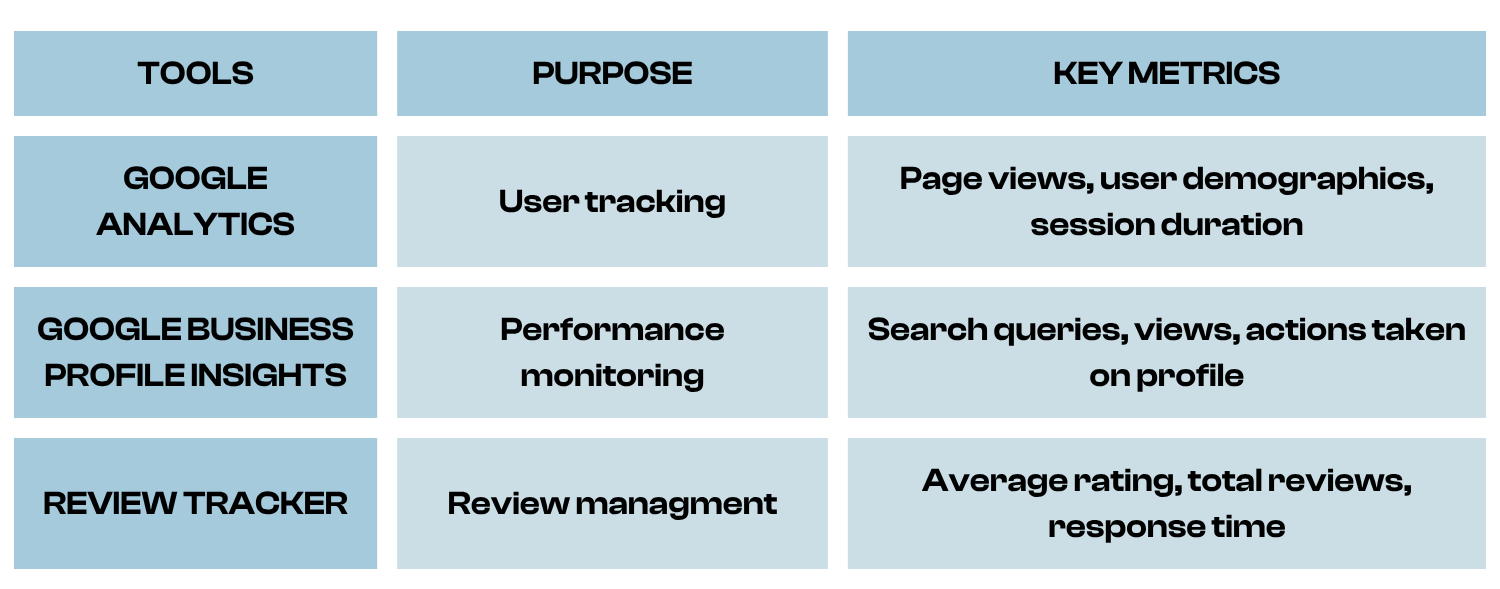
These tools provide insight into the performance of your GBP, enabling continuous improvement and effective engagement strategies with local customers.
How Often Should GBP Content and Structured Data Be Updated for Optimal Results?
Regular updates are critical to maintaining the effectiveness of your Google Business Profile. Frequent updates to essential information, such as hours of operation or promotions, ensure that potential customers have access to the latest offerings.
- Updating Crucial Business Information: Whenever there is a change in hours or services, these should be reflected immediately on your GBP.
- Seasonal Promotions: Regularly refresh your GBP with seasonal offers that can attract customer interest based on current trends.
- Engagement Strategies: Regularly engage with customers through posts and responses, creating a dynamic, interactive profile.
Consistent updates not only benefit customer engagement but can also influence local search rankings positively, driving more traffic to your business.
.png)
Start by Reviewing Your Own Profile's Completeness
A well-optimized Google Business Profile, backed by complete business information, high-quality photos, active review management, and consistent local SEO citations, remains the most direct way for business owners to appear in local search results and turn nearby searchers into leads. From setup and verification through profile optimization, local SEO strategy, and ongoing performance monitoring via GBP Insights, each element reinforces the trust and visibility that convert a search into an inquiry. Business owners who manage their Google Business Profile as an active, evolving marketing asset, rather than a one-time listing, see the strongest gains in engagement, local visibility, and lead generation. Start by reviewing your own profile's completeness and activity today, and build from there.
Share this:






%20(1).webp)

.webp)



.webp)

.webp)







Nothing to see here!
Nothing to see here!